Running AI agents to automate outreach at scale







The Community Science team
When I try to answer the question "What is Hugging Face?" to people, I typically say "We're the home of open and collaborative machine learning". It's the main place where people share their machine learning models, datasets and demos with the world, allowing anyone to build on top of each other's work. At the time of writing, this includes nearly 3 million models and 1 million datasets from labs like OpenAI, DeepSeek, NVIDIA, Google, Meta and a lot more.
One of the things we try to do is making sure that Hugging Face is not just the home for AI practictioners who want to productionize AI, but also for AI researchers. Hence, whenever AI researchers publish their work on GitHub, we check whether the corresponding checkpoints and datasets are on the hub. We still see many researchers relying on platforms like Google Drive, Dropbox, Zenodo or proprietary servers. However, releasing artifacts via these platforms result in low discoverability and visibility.
Hugging Face not only allows researchers to document their artifacts in the form of model and dataset cards, it also enables better discoverability via metadata tags. For example, a computer vision dataset could have task_categories: image-segmentation, a language model could include language tags, an audio model could include the library_name to indicate the library it is compatible with, or a model could include the license to indicate whether the weights are available with an MIT or Apache 2.0 license for instance. People can then simply check for relevant artifacts by using the filter tab on the left side of hf.co/models or hf.co/datasets.
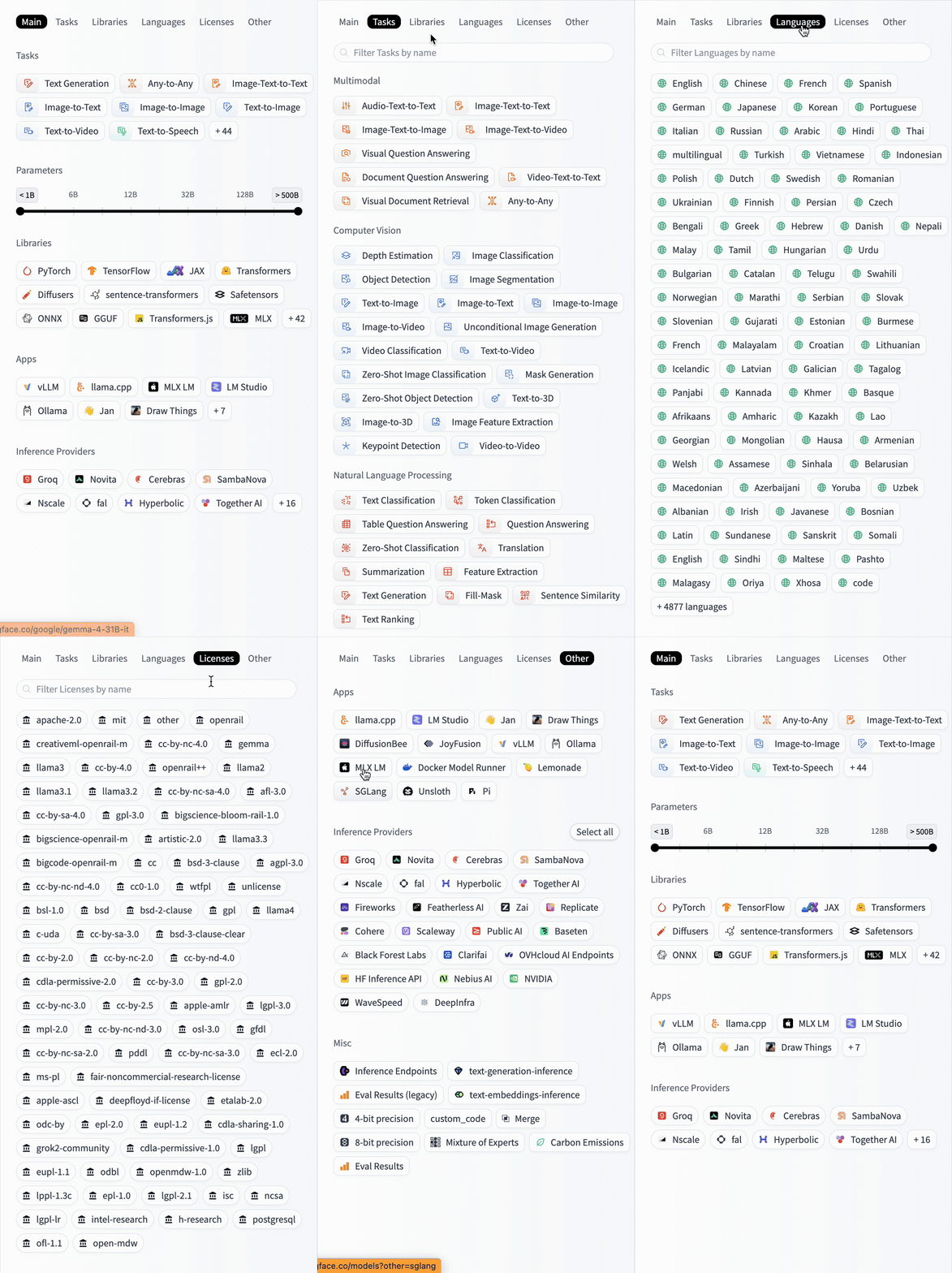
Filter tabs on hf.co/models
Moreover, we now also support Hugging Face Paper Pages. Each time a model, dataset or Space README includes an Arxiv abstract or PDF link, the corresponding paper is indexed on the hub. This enables people to link their artifacts to the corresponding paper on the hub. One can view the linked models, datasets and Space of a paper on the right side, as seen below on this example:
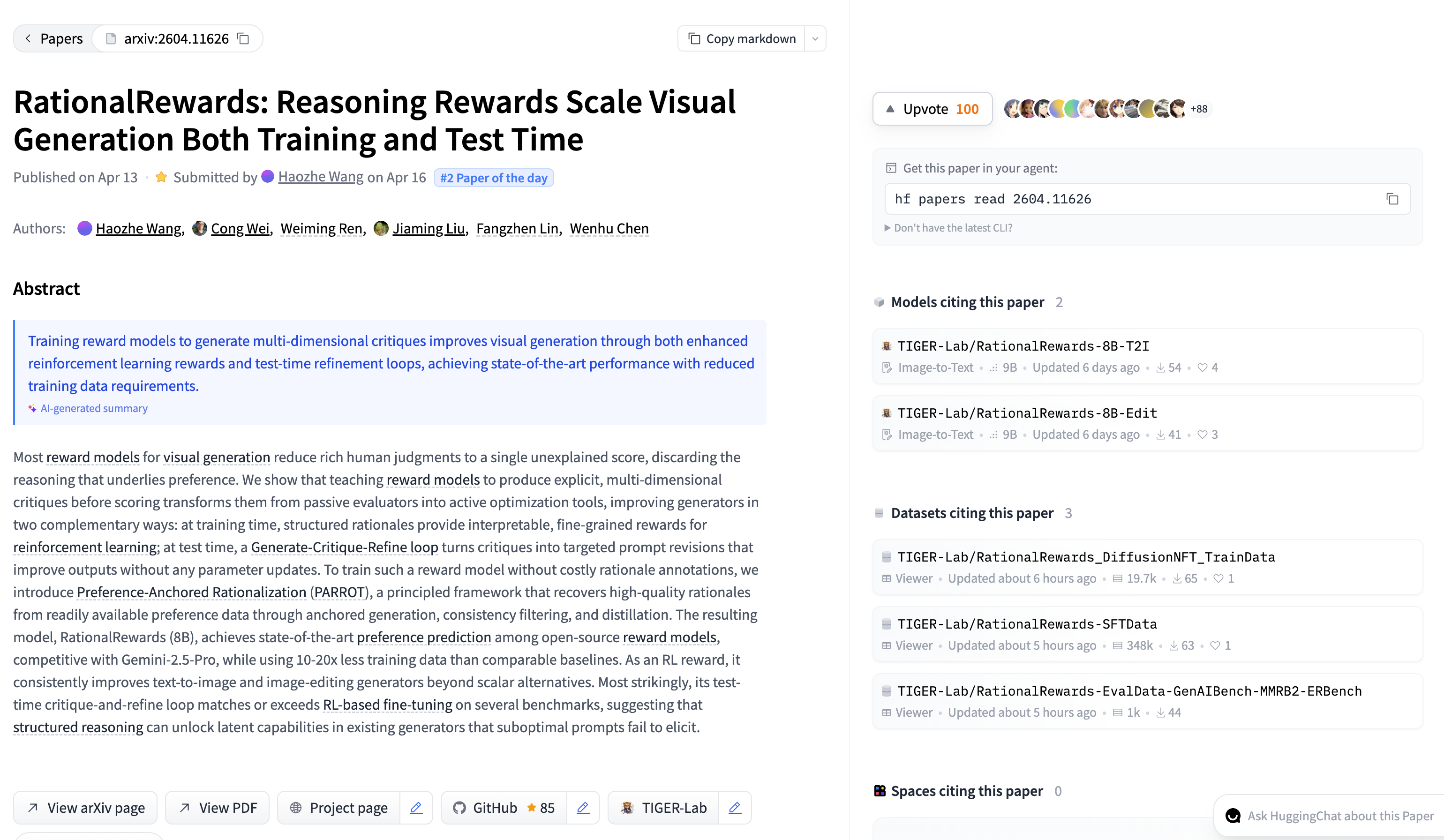
A paper with 2 models and 3 datasets linked
You may know AK on Twitter/X, he's famous for sharing the most interesting AI research papers with nearly 500k followers. One thing I was manually doing a lot, everytime he tweeted out an interesting paper, was checking whether the related artifacts were on the hub already. If not, I would reach out by opening a GitHub issue. It's for this reason that AK and me decided to work together as part of a new effort at Hugging Face: Community Science. The goal is simple: making sure more researchers make their work available on the hub, and document them properly with metadata tags and links to the paper.
Scaling Community Science
Reaching out to authors of every paper manually is not a really scalable task. Every day, there are between 50 and 300 papers coming out on Arxiv.org (computer science category alone!). Initially, this involved a lot of diagonal scanning of papers and GitHub READMEs, and manual writing of GitHub issues.
However, as large language models (LLMs) became more and more powerful, I started to see whether I could replace all of that manual work with an automated workflow. I was greatly inspired by Anthropic's blog post Building Effective Agents, which nicely explains the difference between workflows and fully autonomous AI agents, and why it's best to start with workflows.
I started by writing down the workflow that I typically use when reaching out:
- First, I try to find the GitHub URL of a paper (if available).
- Next, I scan the GitHub README for new artifacts (pre-trained model checkpoints and/or datasets).
- If the paper introduces new artifacts, I check whether they are already on the hub. If not, I open a GitHub issue.
- If the artifacts are on the hub already, I check whether they already contain the appropriate metadata tags and links to the paper page. If not, I open pull requests on the hub.
Hence, when I wanted to automate this using LLMs, I needed them to replicate these 4 steps:
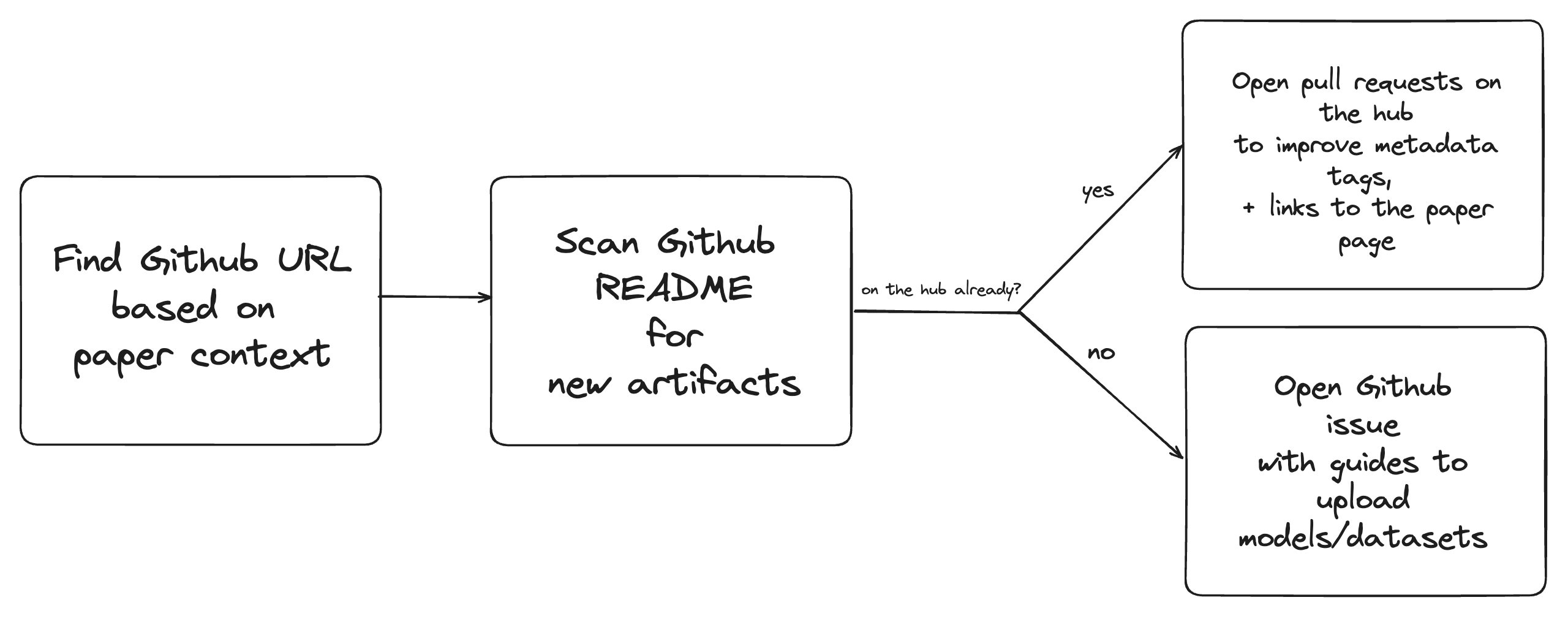
My workflow to reach out to authors
The LLM workflow in detail
In practice, the LLM-based workflow looks a bit more sophisticated, like this:
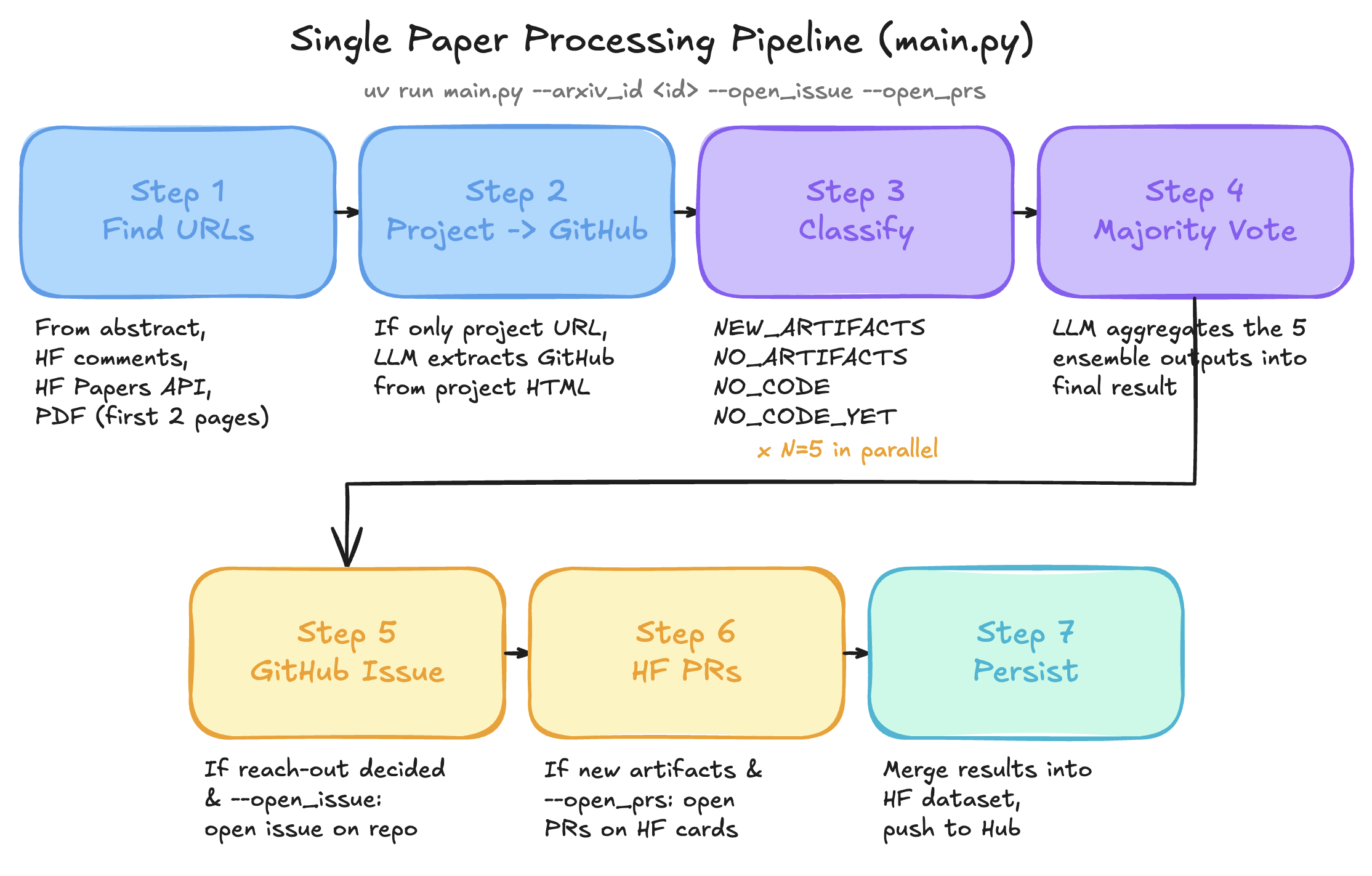
Detailed workflow. Made with Cursor + the
Excalidraw MCP server
— quite amazing!
The first 2 steps of the workflow focus on identifying the Github URL of a paper. I noticed that I sourced this from a variety of places. Sometimes, a paper already mentions it in the abstract, but other times it is mentioned on the first pages of the PDF. Some only mention the project page (which is a custom web page showcasing their work). Finally, some authors only mention it as a comment on hf.co/papers. The second step (finding the GitHub URL based on the project page HTML content) is only used in case step 1 did not yet find the GitHub link.
Next, step 3 involves classifying a paper into one of 4 possible scenarios:
- NEW_ARTIFACTS: the paper comes with a GitHub repository, and introduces new artifacts
- NO_ARTIFACTS: the paper comes with a GitHub repository, but does not introduce any new artifacts (only builds on top of existing ones)
- NO_CODE: the paper does not come with any GitHub repository
- NO_CODE_YET: the paper does not come with any GitHub repository, but the authors mention that they will release one. Or: the paper comes with a GitHub repository already, but does not include any code yet.
This is done by providing the LLM with the same context as me when parsing a paper (paper abstract, first pages of the PDF, GitHub README and potentially project page HTML). Step 3 is ran multiple times in parallel, with step 4 performing a majority vote (involving another LLM call) - I explain the reason in detail below.
Step 5 and 6 involve creation of a GitHub issue and/or hub pull requests, depending on the output of step 4. Finally, step 7 persists the results in a Hugging Face dataset for observability purposes.
Implementation of the workflow
I started implementing this workflow using plain LLM APIs, based on Anthropic's recommendation:
We suggest that developers start by using LLM APIs directly: many patterns can be implemented in a few lines of code. If you do use a framework, ensure you understand the underlying code. Incorrect assumptions about what's under the hood are a common source of customer error.
For the workflow itself, I use a reusable template for each step. Each step involves a prompt, a set of few-shot examples, and an LLM API with structured outputs. As I was providing quite a bit of context to the LLM to classify a paper into the possible scenarios, I relied on the Gemini API. This was mainly because Gemini supports a 1 million context window. Moreover, Gemini is great at parsing documents because of its native multimodality, which made it the best option for extraction/classification tasks.
I rely on few-shot examples based on Stanford's paper Many-Shot In-Context Learning in Multimodal Foundation Models which showed that Gemini's performance greatly improves the more input-output pairs (in the form of interleaving user and assistant messages) you provide. See also my notebook for an in-depth guide.
Below, you can find some pseudocode for each step of the workflow:
from utils import load_prompt
from typing import Optional
from functools import lru_cache

from openai import AsyncOpenAI
from pydantic import BaseModel, Field

# Initialize variables
client = AsyncOpenAI(
    api_key="GEMINI_API_KEY",
    base_url="https://generativelanguage.googleapis.com/v1beta/openai/"
)
template = load_prompt("step.json")

few_shots = {
  "example_arxiv_id_1": "example_response_1",
  "example_arxiv_id_2": "example_response_2"
}

class ExampleSchema(BaseModel):
    reasoning: str = Field(description="The reasoning behind researching the GitHub URL")
    github_url: Optional[str] = Field(
        default=None, description="The GitHub URL of the paper"
    )

@lru_cache()
async def create_user_message(arxiv_id: str) -> dict
   """
   Create a single OpenAI-compatible user message.
   """
   # gather context
   abstract, paper_page_comments = await get_context(arxiv_id=arxiv_id)

   # format the prompt template
   prompt = template.format(arxiv_id=arxiv_id, abstract=abstract, paper_page_comments=paper_page_comments)

   return {"role": "user", "content": prompt}


async def step(arxiv_id: str, few_shots: list[dict]) -> tuple:
   """
   A single LLM step of the workflow.
   """
   # add few-shot examples (note: Gemini-specific, may not work with newer reasoning models)
   messages = {}
   for example_arxiv_id, example_output in few_shots.items():
      example_user_message = await create_user_message(arxiv_id=example_arxiv_id)
      messages.append(example_user_message)
      messages.append({"role": "assistant", "content": example_output})

   # add new query
   user_message = await create_user_message(arxiv_id=arxiv_id)
   messages.append(user_message)

   # pass to LLM with structured outputs (async)
   completion = await client.chat.completions.parse(
        model="gemini-3-flash-preview",
        messages=messages,
        response_format=ExampleSchema,
    )
    outputs = completion.choices[0].message.parsed

   # return result
   return outputs["key1"], outputs["key2"]
Moreover, I noticed that step 3 with a single LLM API call often resulted in unreliable performance with misclassifications. Hence, inspired by the paper Large Language Monkeys: Scaling Inference Compute with Repeated Sampling, I run this step N times in parallel (using Python's asyncio), followed by another LLM API call which performs a majority vote (step 4). This results in much more reliable results (but also comes with higher costs as you're running more LLM API calls). See below for some pseudocode.
import asyncio

def parallel_step(num_iterations: int = 3, arxiv_id: str, few_shots: list[dict]) -> tuple:
  """
  Run a step multiple times in parallel with majority voting.
  """
  tasks = [step(arxiv_id, few_shots) for _ in range(num_iterations)]

  # run step multiple times
  results = await asyncio.gather(*tasks)

  # have another step doing a majority vote
  majority_vote_results = await majority_vote_step(arxiv_id=arxiv_id, results=results)

  return majority_vote_results
This is also inspired by Phillip Schmid's great blog post on Agentic patterns, where parallellization is one of the possible patterns to include in a workflow.
The entirely workflow is implemented in Python and can be run with a single command like so:
uv run main.py --arxiv_id <your-arxiv-id> --open_issue --open_prs
Here are some example issues it created on GitHub:
- https://github.com/tue-mps/eomt/issues/1
- https://github.com/Intellindust-AI-Lab/DEIMv2/issues/20
- https://github.com/google-deepmind/tips/issues/2
- https://github.com/PaddlePaddle/PaddleX/issues/3711
Here are some example pull requests it opened on the hub:
- https://huggingface.co/datasets/SII-YDD/Orchid/discussions/1
- https://huggingface.co/xx18/Baseline-4B-MATH12K/discussions/1
- https://huggingface.co/datasets/Jord8061/datasets/discussions/2
In total, my user account has made over 14,000 contributions.
Deployment tips and tricks
To run this script at scale on many Arxiv IDs on a regular basis (also called a CRON job), there are a few options:
- Github Actions. I recommend this guide which I used to deploy the initial version.
- scheduled Hugging Face Jobs, which allows to run any compute on HF's infrastructure.
- Modal, which offers support for batch processing
- one of the hyperscalers, e.g. Cloud Run Jobs on Google Cloud.
Some might call my workflow an "agent", but it is also just a CRON job that involves LLM APIs ;)

Lots of AI agents are actually just webooks or cron jobs
Evaluation
I also have some learnings regarding evaluation and observability. As for the latter, besides writing the results to a HF dataset, I use LangFuse to observe all the LLM API calls. It's a really great platform that enables to easily trace all the inputs, outputs of your LLMs, track latency and costs, and more.
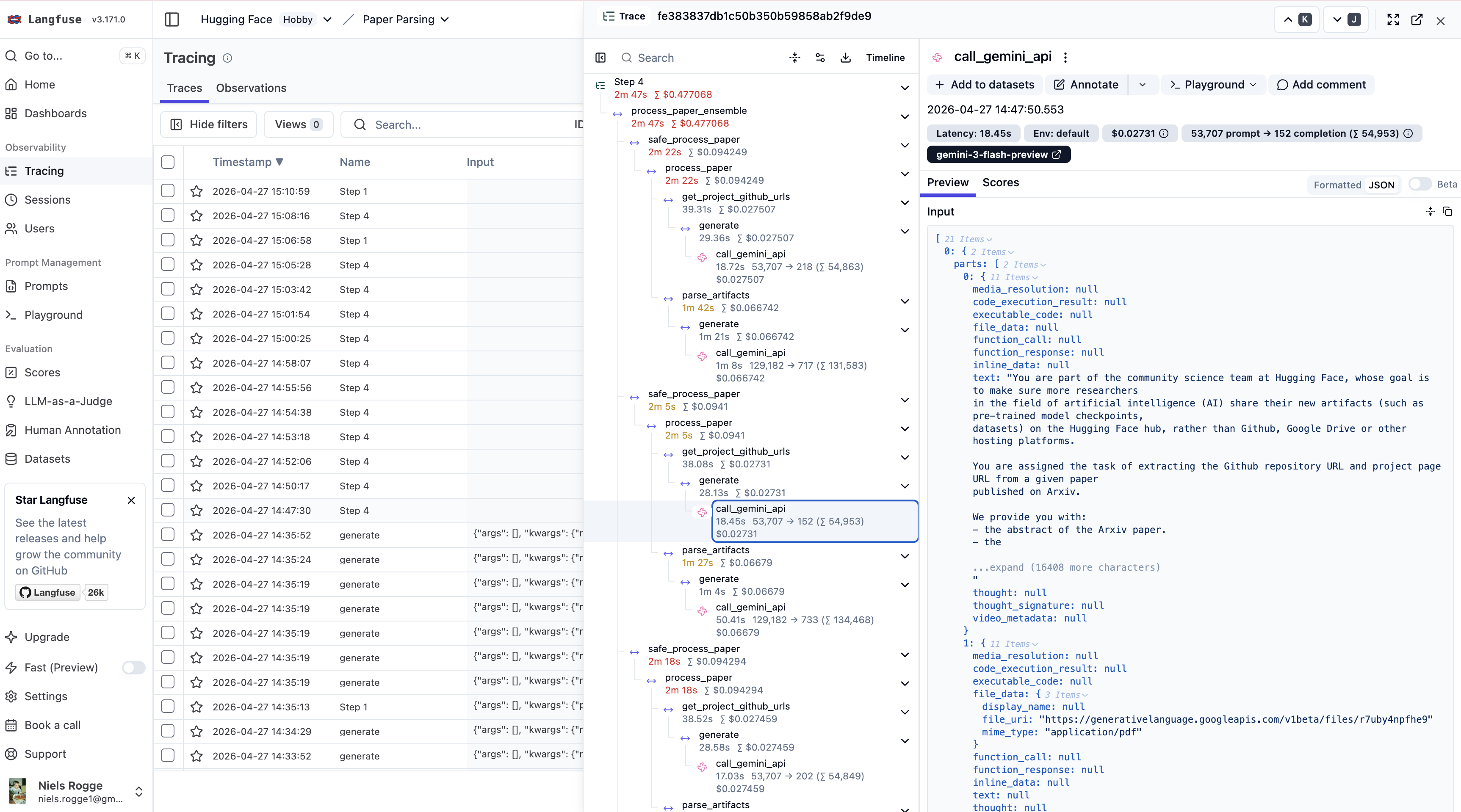
LangFuse enables to easily observe the inputs and outputs (e.g. step 4)
As for evaluation, I was greatly inspired by Hamel Husain's LLM Evals blog post. He gives some really good tips and tricks regarding evaluating your LLM application. One of the things he recommends is performing error analysis by "looking at your data". So that's exactly what I did: I checked every single PR Gemini made on the hub and manually reviewed them in a spreadsheet. This helped me to iterate on my prompts and improve my code.
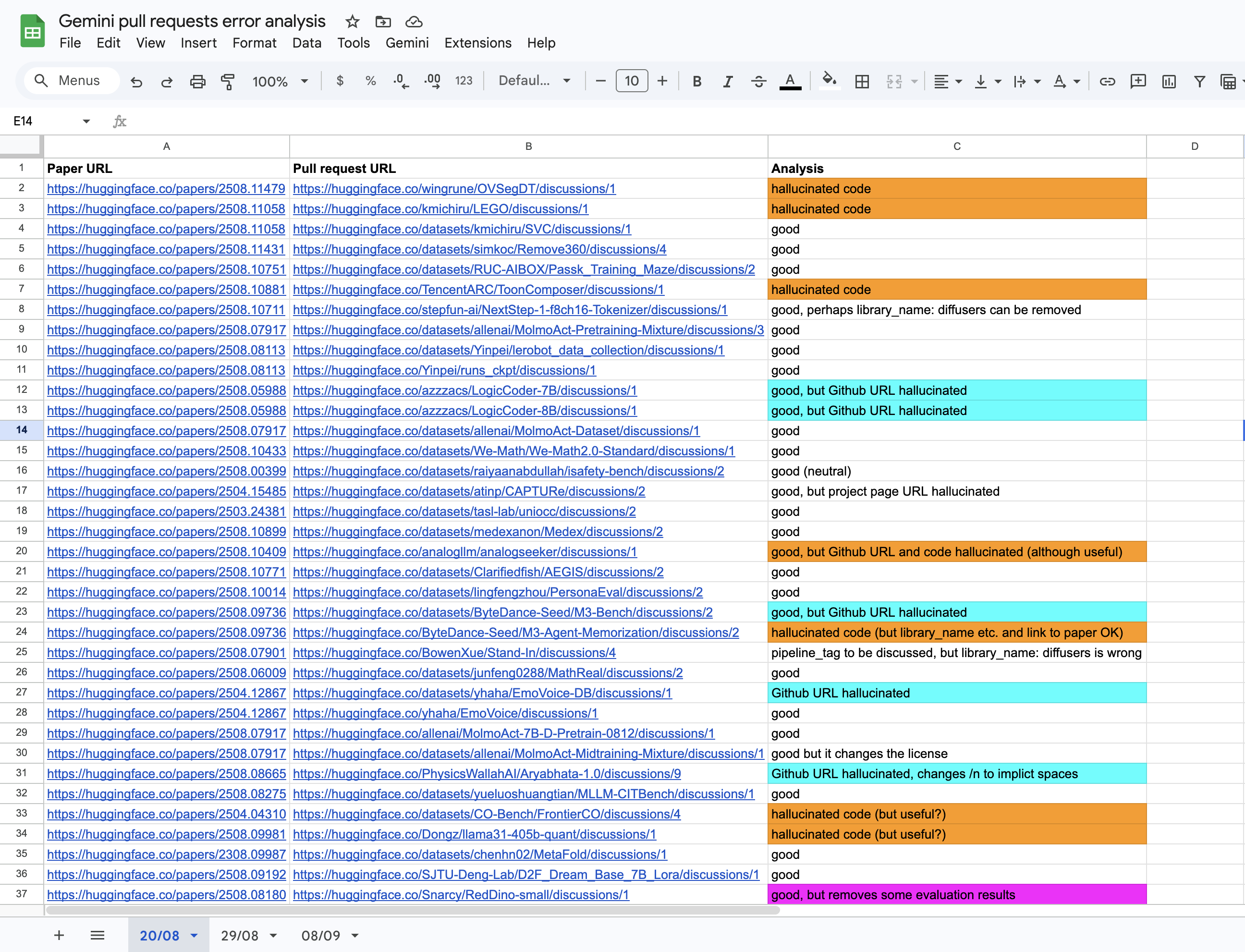
Error analysis on Gemini's work (and clustering issues)
Besides, I also vibe-coded a Space to help me review Gemini's work more easily. Next to error analysis, it also enables me to view the number of merged PRs at a glance:
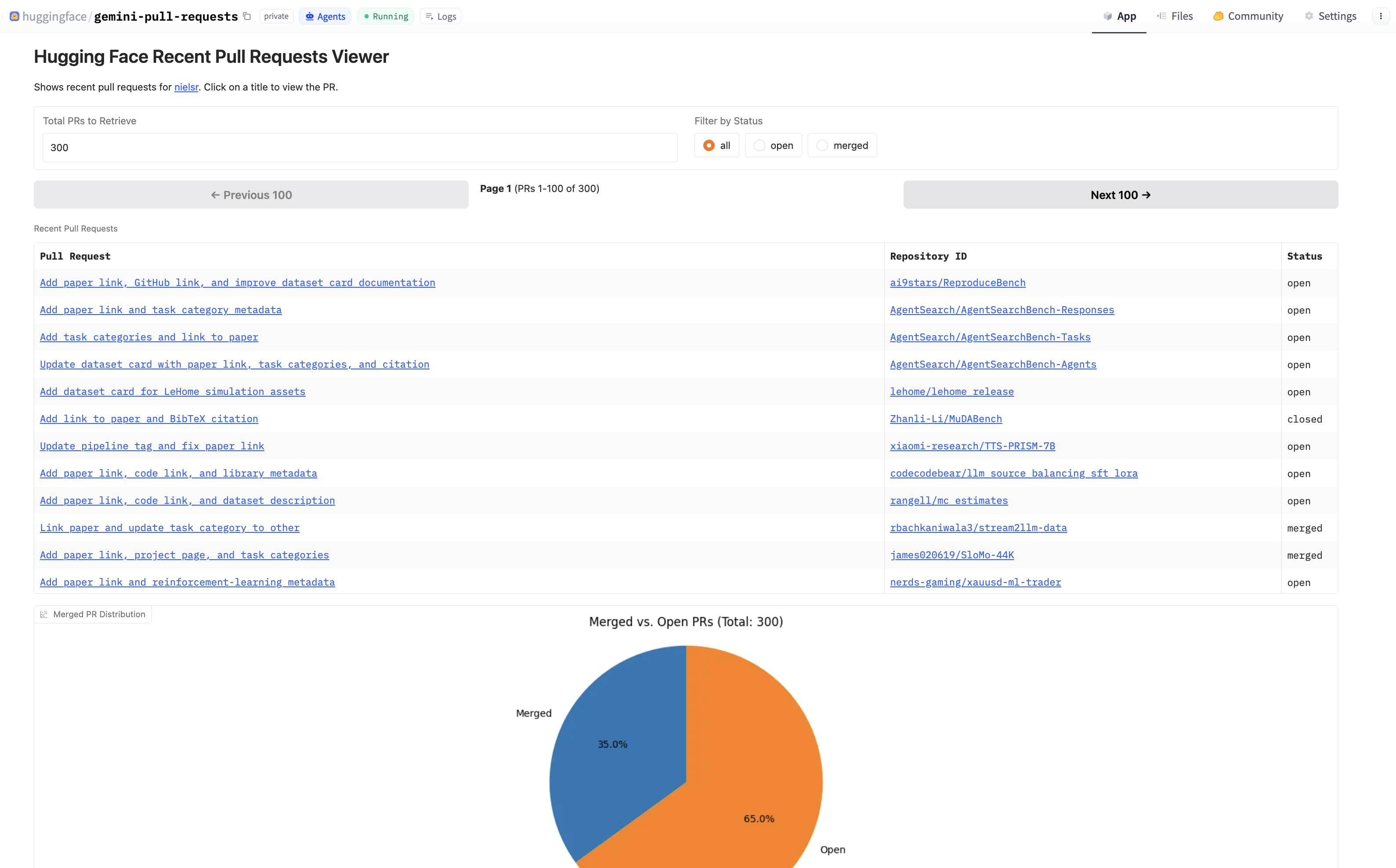
A Space which helps me to review Gemini's work
Replacing workflows with an autonomous agent
As we're 2026, we gradually see workflows getting replaced by autonomous agents such as Claude Code or Cursor. Hence, instead of hardcoding the workflow, one could now just provide an LLM of choice with a set of tools (mostly, Bash) and let it do its thing. I'm a big fan of the Claude Agents SDK and have already experimented with replacing the Gemini-based workflow by just Claude + tools.

Difference between agents and workflows. Taken from Matt Pocock
However, while autonomous agents offer a lot more flexibility, they are also a lot less predictable. Hence, it still makes sense to work with workflows in case you know exactly the steps that you want to automate using LLMs. The workflow discussed above therefore simply uses LLM API calls in each of the steps, and does not involve any MCP, Skills or CLIs.
In a future blog post, I might explain when I use a fully autonomous agent vs. a workflow.