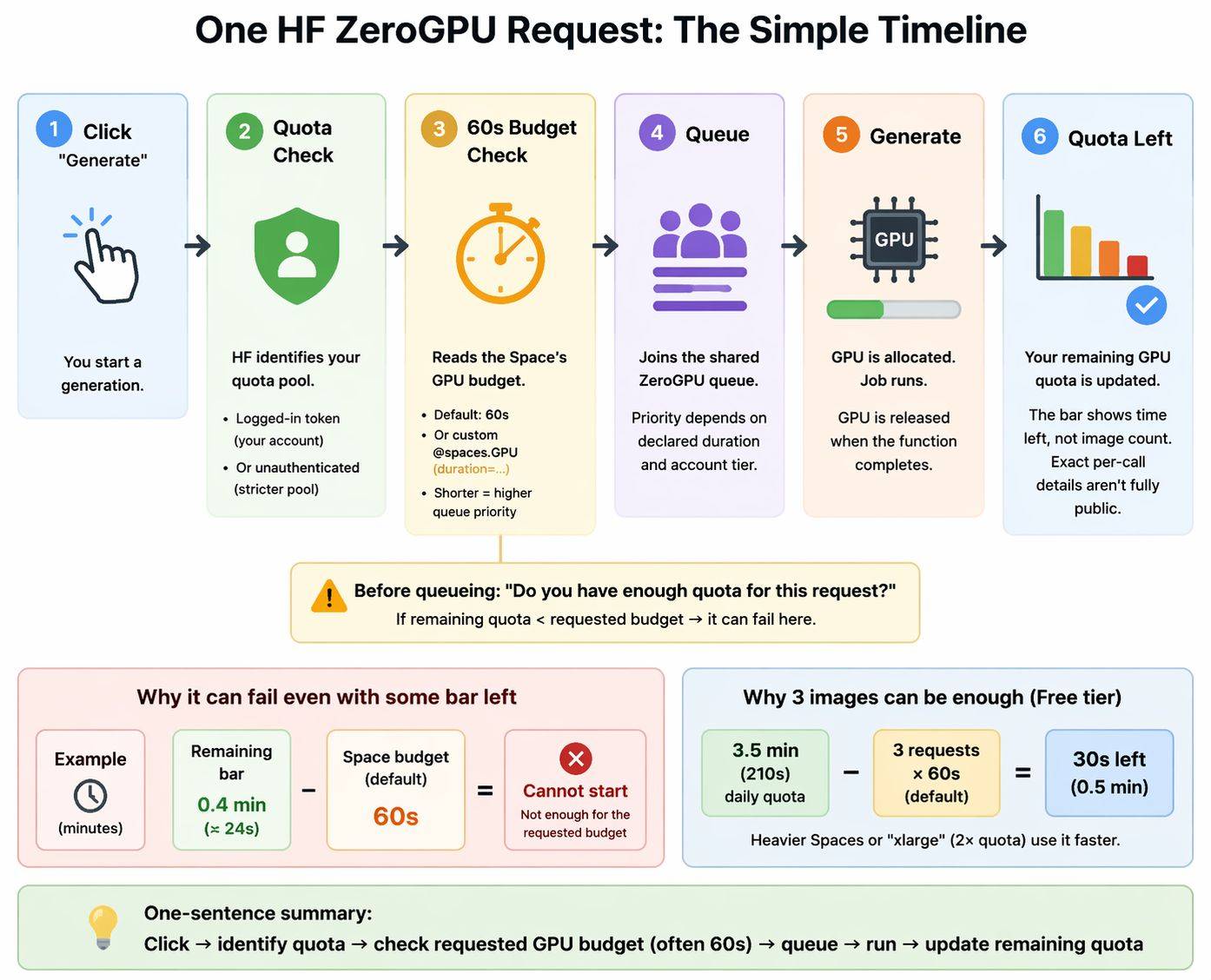
I created a guide (click here for the detailed version):
The reliable way is to treat this as two separate jobs:
- Duplicate the Space correctly
- Recreate the runtime conditions that made the original work
That matters because a duplicated Hugging Face Space is private by default, falls back to free CPU by default unless you choose other hardware, copies public Variables but not Secrets, and ZeroGPU itself is a separate runtime with its own rules. (Hugging Face)
What ZeroGPU is, before you duplicate
ZeroGPU is not “normal GPU Spaces, but free.” It is a shared ZeroGPU runtime for Gradio Spaces only, backed by NVIDIA H200 capacity, with a default 60-second GPU duration per @spaces.GPU call unless the app sets another duration. Hugging Face also notes that ZeroGPU can have limited compatibility compared with standard GPU Spaces, even though it supports Gradio 4+ and a wide range of PyTorch versions. (Hugging Face)
That is why a duplicated repo can be correct as code, but still fail as an app. The source Space may depend on the same SDK, the same hardware, the same secrets, the same startup behavior, and the same request path assumptions. (Hugging Face)
The safest way to duplicate a ZeroGPU Space to a private ZeroGPU Space
1. Inspect the source Space first
Before clicking Duplicate this Space, check:
- whether it is really a Gradio Space
- whether the README/YAML pins
sdk_version or python_version
- whether it pulls gated or private models
- whether it downloads large files at startup
- whether it clearly expects ZeroGPU behavior rather than ordinary GPU behavior
Those checks matter because the README YAML controls important runtime settings like python_version, sdk_version, startup_duration_timeout, and preload_from_hub. (Hugging Face)
2. Duplicate it as faithfully as possible
For the first duplicate, keep it conservative:
- set Visibility = Private
- keep the same SDK as the source
- if the source is ZeroGPU, choose ZeroGPU
- do not switch to CPU or paid GPU yet unless you are intentionally migrating
This matters because Hugging Face says duplicated Spaces default to free CPU hardware unless you choose otherwise. That is one of the easiest ways to create a “works there, broken here” duplicate. (Hugging Face)
3. Recreate secrets immediately
This is the most common duplication miss.
Hugging Face documents that Variables can be auto-copied into duplicates, but Secrets are not copied. So if the original uses HF_TOKEN, third-party API keys, OAuth credentials, or anything private, you need to add them again in the duplicate’s Settings. (Hugging Face)
If the app needs access to a private or gated model, dataset, or other repo, use a Hugging Face access token with the needed permissions. Hugging Face documents User Access Tokens as the normal authentication method, and a read token is enough for read-only access to private repos you can read. (Hugging Face)
4. First test from the standard HF Space page
For the first validation, open the duplicate from the normal Hugging Face Space page while logged in. Do not start with:
- direct
*.hf.space URLs
- embeds
- custom frontends
- API clients
Gradio documents that ZeroGPU request accounting uses the X-IP-Token header. If that identity path is missing, the request may be treated as unauthenticated, which can make a perfectly fine duplicate look broken or quota-limited. (Gradio)
5. Run the smallest realistic test first
Do not start with the heaviest prompt, the biggest image, or the longest job. Use the smallest input that should still succeed.
That matters because ZeroGPU defaults to a 60-second duration budget, and Hugging Face explicitly says shorter durations improve queue priority. It also explains why quota can feel “chunky” instead of matching only the wall-clock time you noticed. (Hugging Face)
The fast troubleshooting rule
After duplication, do not debug randomly. First classify the failure:
- stuck on
Building
Running, but behaves differently- quota/auth looks wrong
- browser works, API fails
- ZeroGPU/CUDA error
That classification-first approach is the fastest path because each bucket has a different likely cause and different next move. (Hugging Face Forums)
How to fix errors after duplication
A. Stuck on Building
Building is not one single failure. The current Hugging Face forum guidance breaks it into multiple layers: repo/YAML read, build, scheduling, provisioning, then app health. (Hugging Face Forums)
Use this order:
- Check the Hugging Face status page and recent reports.
- If the platform looks healthy, try Restart once.
- Then try Factory rebuild once.
- Only then inspect dependencies and startup config.
That order matches the forum guidance for recent Building failures. (Hugging Face Forums)
If logs are empty or show only queue-like behavior, suspect platform or scheduler state first, not your app code. If build logs show dependency failures, suspect dependency drift first. A fresh duplicate rebuilds now, under current conditions, which may differ from the environment that the source Space originally built under. (Hugging Face Forums)
If build finishes but the Space never becomes healthy, check README/YAML settings such as:
startup_duration_timeoutpreload_from_hub
Hugging Face says startup_duration_timeout defaults to 30 minutes, and preload_from_hub shifts large Hub downloads into build time so startup is faster and less fragile. (Hugging Face)
B. Running, but not like the original
When the duplicate reaches Running but behaves differently, the usual cause is environment drift, not a broken duplicate button.
A recent Hugging Face forum case showed a duplicate on the same ZeroGPU class behaving differently from the original until dependencies were pinned more tightly. (Hugging Face Forums)
Check in this order:
- smallest possible input
- one Factory rebuild
requirements.txtsdk_versionpython_version- whether hardware really matches
- whether a secret or access token is missing
This is the right place to be suspicious of version drift. “Same repo” does not guarantee “same resolved environment.” (Hugging Face Forums)
C. Quota exceeded, PRO ignored, or quota looks wrong
Do not assume this is real quota exhaustion.
Gradio documents that ZeroGPU uses X-IP-Token for request identity, and there is also a recent GitHub issue showing that custom gr.Server frontends can miss the handshake and cause logged-in PRO users to be treated like unauthenticated users. (Gradio)
Use this order:
- test from the normal HF Space page while logged in
- avoid direct
*.hf.space links at first
- avoid custom frontends at first
- check whether the Space is on an old Gradio version
That last point matters because a Hugging Face forum reply specifically says a broader quota-related bug was resolved in Gradio 5.12.0 or newer. (Hugging Face Forums)
For background, current Hugging Face docs say ZeroGPU daily quota is 2 minutes for unauthenticated users, 3.5 minutes for free accounts, 25 minutes for PRO, and resets 24 hours after first GPU usage. (Hugging Face)
D. Browser works, API fails
If the private duplicate works in the browser but API calls fail, suspect auth first.
Hugging Face documents that every Gradio Space can be used as an API endpoint, and the standard programmatic path is the Gradio client with a token. (Hugging Face)
For a private duplicate:
- confirm the Space works in the browser first
- then test with an authenticated token
- use a Hugging Face access token with the needed read access for private resources
That separates “the app is broken” from “the app is fine, but your API request is not authorized.” (Hugging Face)
For ZeroGPU, there is a second layer: API access and ZeroGPU request identity are related but not identical. You can be authorized to access the private Space and still have a bad X-IP-Token path for ZeroGPU accounting. (Hugging Face)
E. CUDA has been initialized before importing the spaces package
This is a classic ZeroGPU-specific error.
The usual meaning is: something touched CUDA too early, before ZeroGPU could manage GPU allocation the way it expects. Hugging Face’s ZeroGPU docs say the intended pattern is:
- select ZeroGPU hardware
import spaces- put GPU work behind
@spaces.GPU
A forum thread with that exact error confirms this pattern in practice. (Hugging Face)
What to check:
torch.cuda.is_available() at import timemodel.to("cuda") too early- any CUDA-touching library side effects before
import spaces
The fix is to move GPU work into the ZeroGPU-managed path instead of letting CUDA initialize too early. (Hugging Face)
F. No CUDA GPUs are available
This error can be either:
- a transient ZeroGPU/platform problem
- an app/runtime mismatch
A Hugging Face forum thread shows this exact error on ZeroGPU, and a follow-up reply reported that a retry/replication later worked again, which suggests at least some cases are transient. (Hugging Face Forums)
Use this order:
- retry once
- restart once
- if it clears, do not rewrite code yet
- if it persists only in your duplicate, inspect CUDA timing and dependency pins
That keeps you from wasting time on a transient platform issue. (Hugging Face Forums)
G. ZeroGPU worker error RuntimeError
Treat this as a symptom bucket, not a diagnosis.
Forum reports show that this class of error can be caused by broader platform issues, by temporary ZeroGPU instability, or by app-specific dependency problems. (Hugging Face Forums)
Use this order:
- retry once
- restart once
- see whether many unrelated ZeroGPU Spaces are failing too
- if only your duplicate fails, inspect versions and rebuild state
If many Spaces fail at the same time, suspect platform conditions. If only your duplicate fails, suspect runtime drift first. (Hugging Face Forums)
H. ZeroGPU illegal duration or “requested GPU duration is larger than the maximum allowed”
This usually means the app requested an unrealistic GPU duration, not that duplication failed.
Hugging Face documents the default duration as 60 seconds and shows custom duration examples like @spaces.GPU(duration=120). A forum thread shows “300s” triggering the illegal-duration error. (Hugging Face)
What to do:
- find
@spaces.GPU(duration=...)
- lower it
- retest with a smaller workload
- keep GPU sections narrow and only as long as needed
Also note that xlarge consumes 2× the daily quota of large, so using a bigger ZeroGPU size can make quota pressure worse, not better. (Hugging Face)
When to move to paid GPU
Move to paid GPU after you get one clean minimal success on a faithful private ZeroGPU duplicate.
That is the safest point to migrate because then you know the code, secrets, and startup path are basically correct. The migration is no longer mixed up with duplication mistakes. The recent forum thread about “ZeroGPU to paid hardware” is really a migration problem, not a plain duplication problem. (Hugging Face Forums)
The short version
Use this order:
- confirm the source is a Gradio ZeroGPU Space
- duplicate it as Private + same SDK + same ZeroGPU class
- recreate Secrets and any needed
HF_TOKEN
- test from the standard HF Space page while logged in
- run the smallest input first
- classify the first failure instead of changing many things at once
- only after one success, optimize startup or migrate to paid GPU
That is the cleanest beginner-safe workflow because it separates repo duplication from runtime reconstruction. (Hugging Face)
The most useful references to keep open while doing this are the official Spaces Overview, ZeroGPU, Spaces Configuration Reference, Spaces as API endpoints, the Gradio Using ZeroGPU Spaces with the Clients guide, and the recent Hugging Face forum threads on Building, quota, and duplicate behaves differently. (Hugging Face)