Duplicated from Baragi-AI/Munche-768
How to use yangpapa/Munche-768 with PEFT:
from peft import PeftModel
from transformers import AutoModel

base_model = AutoModel.from_pretrained("google/embeddinggemma-300m")
model = PeftModel.from_pretrained(base_model, "yangpapa/Munche-768")
How to use yangpapa/Munche-768 with sentence-transformers:
from sentence_transformers import SentenceTransformer

model = SentenceTransformer("yangpapa/Munche-768")

sentences = [
    "The weather is lovely today.",
    "It's so sunny outside!",
    "He drove to the stadium."
]
embeddings = model.encode(sentences)

similarities = model.similarity(embeddings, embeddings)
print(similarities.shape)
# [3, 3]
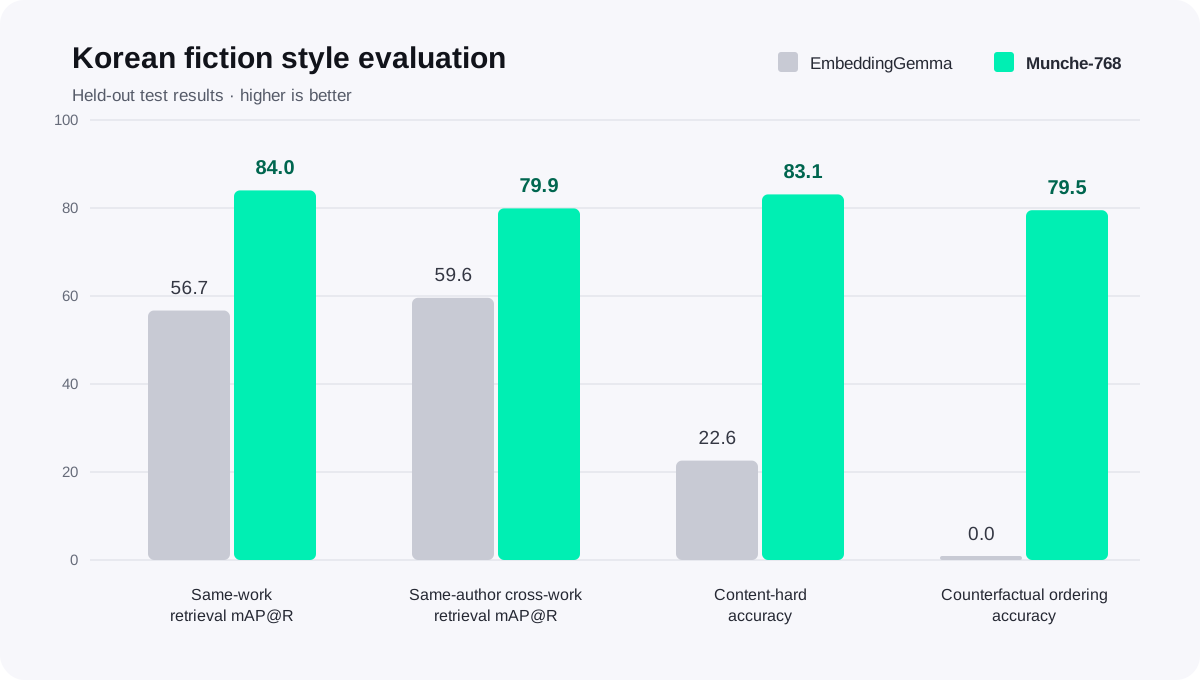
https://huggingface.co/yangpapa/Munche-768/resolve/main/assets/performance-comparison.svg
hf download hf://yangpapa/Munche-768/assets/performance-comparison.svg
curl -L -o performance-comparison.svg https://huggingface.co/yangpapa/Munche-768/resolve/main/assets/performance-comparison.svg