Text Generation
Transformers
Safetensors
Minangkabau
qwen3_5
image-text-to-text
trimmed
conversational
🇪🇺 Region: EU
Instructions to use alphaedge-ai/Qwen3.5-0.8B-min-16384 with libraries, inference providers, notebooks, and local apps. Follow these links to get started.
- Libraries
- Transformers
How to use alphaedge-ai/Qwen3.5-0.8B-min-16384 with Transformers:
# Use a pipeline as a high-level helper from transformers import pipeline pipe = pipeline("text-generation", model="alphaedge-ai/Qwen3.5-0.8B-min-16384") messages = [ { "role": "user", "content": [ {"type": "image", "url": "https://huggingface.co/datasets/huggingface/documentation-images/resolve/main/p-blog/candy.JPG"}, {"type": "text", "text": "What animal is on the candy?"} ] }, ] pipe(text=messages)# Load model directly from transformers import AutoProcessor, AutoModelForImageTextToText processor = AutoProcessor.from_pretrained("alphaedge-ai/Qwen3.5-0.8B-min-16384") model = AutoModelForImageTextToText.from_pretrained("alphaedge-ai/Qwen3.5-0.8B-min-16384") messages = [ { "role": "user", "content": [ {"type": "image", "url": "https://huggingface.co/datasets/huggingface/documentation-images/resolve/main/p-blog/candy.JPG"}, {"type": "text", "text": "What animal is on the candy?"} ] }, ] inputs = processor.apply_chat_template( messages, add_generation_prompt=True, tokenize=True, return_dict=True, return_tensors="pt", ).to(model.device) outputs = model.generate(**inputs, max_new_tokens=40) print(processor.decode(outputs[0][inputs["input_ids"].shape[-1]:])) - Notebooks
- Google Colab
- Kaggle
- Local Apps Settings
- vLLM
How to use alphaedge-ai/Qwen3.5-0.8B-min-16384 with vLLM:
Install from pip and serve model
# Install vLLM from pip: pip install vllm # Start the vLLM server: vllm serve "alphaedge-ai/Qwen3.5-0.8B-min-16384" # Call the server using curl (OpenAI-compatible API): curl -X POST "http://localhost:8000/v1/chat/completions" \ -H "Content-Type: application/json" \ --data '{ "model": "alphaedge-ai/Qwen3.5-0.8B-min-16384", "messages": [ { "role": "user", "content": "What is the capital of France?" } ] }'Use Docker
docker model run hf.co/alphaedge-ai/Qwen3.5-0.8B-min-16384
- SGLang
How to use alphaedge-ai/Qwen3.5-0.8B-min-16384 with SGLang:
Install from pip and serve model
# Install SGLang from pip: pip install sglang # Start the SGLang server: python3 -m sglang.launch_server \ --model-path "alphaedge-ai/Qwen3.5-0.8B-min-16384" \ --host 0.0.0.0 \ --port 30000 # Call the server using curl (OpenAI-compatible API): curl -X POST "http://localhost:30000/v1/chat/completions" \ -H "Content-Type: application/json" \ --data '{ "model": "alphaedge-ai/Qwen3.5-0.8B-min-16384", "messages": [ { "role": "user", "content": "What is the capital of France?" } ] }'Use Docker images
docker run --gpus all \ --shm-size 32g \ -p 30000:30000 \ -v ~/.cache/huggingface:/root/.cache/huggingface \ --env "HF_TOKEN=<secret>" \ --ipc=host \ lmsysorg/sglang:latest \ python3 -m sglang.launch_server \ --model-path "alphaedge-ai/Qwen3.5-0.8B-min-16384" \ --host 0.0.0.0 \ --port 30000 # Call the server using curl (OpenAI-compatible API): curl -X POST "http://localhost:30000/v1/chat/completions" \ -H "Content-Type: application/json" \ --data '{ "model": "alphaedge-ai/Qwen3.5-0.8B-min-16384", "messages": [ { "role": "user", "content": "What is the capital of France?" } ] }' - Docker Model Runner
How to use alphaedge-ai/Qwen3.5-0.8B-min-16384 with Docker Model Runner:
docker model run hf.co/alphaedge-ai/Qwen3.5-0.8B-min-16384
metadata
pipeline_tag: text-generation
language: min
license: apache-2.0
tags:
- trimmed
library_name: transformers
base_model: Qwen3.5-0.8B
base_model_relation: quantized
datasets:
- lbourdois/fineweb-2-trimming
Qwen3.5-0.8B-min-16384
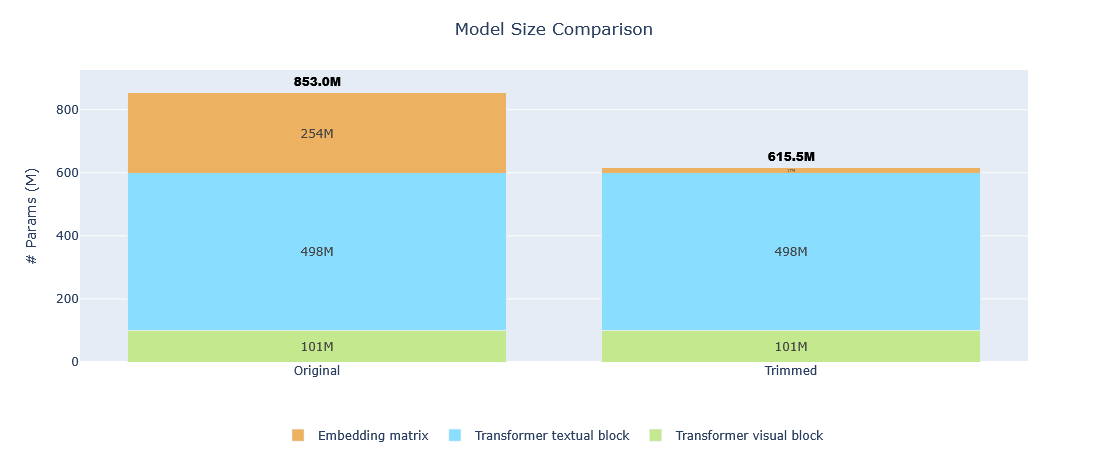
This model is a 27.84% smaller version of Qwen/Qwen3.5-0.8B optimized for Minangkabau language via vocabulary size reduction using the trimming method.
This trimmed model should perform similarly to the original model with only 16,384 tokens and a much smaller memory footprint. However, it may not perform well for other languages as tokens not commonly used in the selected languages were removed from the vocabulary.
Model Statistics
| Metric | Original | Trimmed | Reduction |
|---|---|---|---|
| Vocabulary size | 248,320 tokens | 16,384 tokens | 93.40% |
| Model size | 852,985,920 params | 615,483,456 params | 27.84% |
Mining Dataset Statistics
- Number of texts used for mining: 200,000 texts
- Dataset: lbourdois/fineweb-2-trimming
Usage
from transformers import AutoModelForCausalLM, AutoTokenizer
model_name = "alphaedge-ai/Qwen.5-0.8B-min-32768"
# load the tokenizer and the model
tokenizer = AutoTokenizer.from_pretrained(model_name, trust_remote_code=True)
model = AutoModelForCausalLM.from_pretrained(
model_name,
torch_dtype="auto",
device_map="auto",
trust_remote_code=True
)
# prepare the model input
prompt = "Your prompt in Minangkabau."
messages = [
{"role": "user", "content": prompt}
]
text = tokenizer.apply_chat_template(
messages,
tokenize=False,
add_generation_prompt=True
)
model_inputs = tokenizer([text], return_tensors="pt").to(model.device)
# conduct text completion
generated_ids = model.generate(
**model_inputs,
max_new_tokens=32768
)
output_ids = generated_ids[0][len(model_inputs.input_ids[0]):]
content = tokenizer.decode(output_ids, skip_special_tokens=True)
print("content:", content)
Citations
Qwen3
@misc{qwen3.5,
title = {Qwen3.5: Towards Native Multimodal Agents},
author = {Qwen Team},
month = {February},
year = {2026},
url = {https://qwen.ai/blog?id=qwen3.5}
}
Trimming blog post
@misc{hf_blogpost_trimming,
title={Introduction to Trimming},
author={Loïck BOURDOIS and Tom AARSEN and Bram VANROY and Christopher AKIKI and Woojun JUNG and Manuel ROMERO and Prithiv SAKTHI},
year={2026},
url={https://huggingface.co/blog/lbourdois/introduction-to-trimming},
}
