

Note: This repository contains the
GGUF4-bit quantized variant ofhalbihn/NeuralHermes-2.5-Mistral-7Bfor the full version visit the link

NeuralHermes 2.5 - Mistral 7B
NeuralHermes is based on the teknium/OpenHermes-2.5-Mistral-7B model that has been further fine-tuned with Direct Preference Optimization (DPO) using the mlabonne/chatml_dpo_pairs dataset. It surpasses the original model on most benchmarks (see results).
It is directly inspired by the RLHF process described by Intel/neural-chat-7b-v3-1's authors to improve performance. I used the same dataset and reformatted it to apply the ChatML template.
The code to train this model is available on Google Colab. It required an A100 GPU for about an hour.
Quantized models
- GGUF: https://huggingface.co/TheBloke/NeuralHermes-2.5-Mistral-7B-GGUF
- AWQ: https://huggingface.co/TheBloke/NeuralHermes-2.5-Mistral-7B-AWQ
- GPTQ: https://huggingface.co/TheBloke/NeuralHermes-2.5-Mistral-7B-GPTQ
- EXL2:
- 3.0bpw: https://huggingface.co/LoneStriker/NeuralHermes-2.5-Mistral-7B-3.0bpw-h6-exl2
- 4.0bpw: https://huggingface.co/LoneStriker/NeuralHermes-2.5-Mistral-7B-4.0bpw-h6-exl2
- 5.0bpw: https://huggingface.co/LoneStriker/NeuralHermes-2.5-Mistral-7B-5.0bpw-h6-exl2
- 6.0bpw: https://huggingface.co/LoneStriker/NeuralHermes-2.5-Mistral-7B-6.0bpw-h6-exl2
- 8.0bpw: https://huggingface.co/LoneStriker/NeuralHermes-2.5-Mistral-7B-8.0bpw-h8-exl2
Results
Update: NeuralHermes-2.5 became the best Hermes-based model on the Open LLM leaderboard and one of the very best 7b models. 🎉
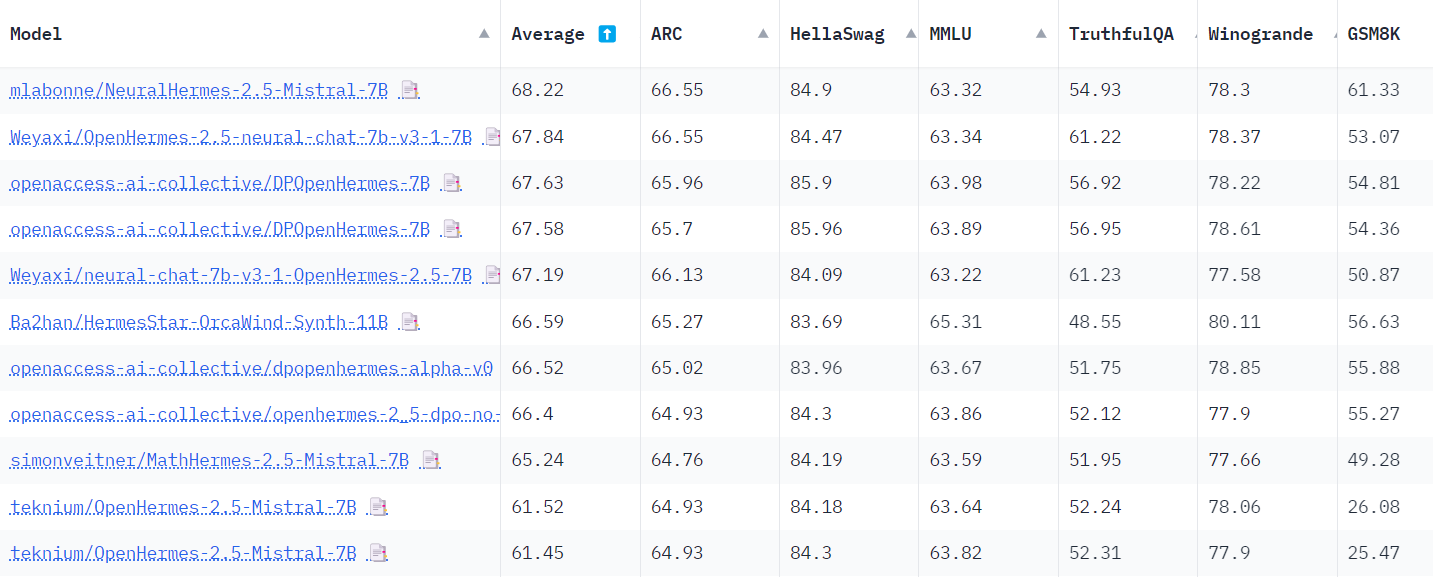
Teknium (author of OpenHermes-2.5-Mistral-7B) benchmarked the model (see his tweet).
Results are improved on every benchmark: AGIEval (from 43.07% to 43.62%), GPT4All (from 73.12% to 73.25%), and TruthfulQA.
AGIEval

GPT4All

TruthfulQA

You can view the Weights & Biases report here.
Usage
You can run this model using LM Studio or any other frontend.
You can also run this model using the following code:
import transformers
from transformers import AutoTokenizer

model_id = "halbihn/NeuralHermes-2.5-Mistral-7B"

# Format prompt
message = [
    {"role": "system", "content": "You are a helpful assistant chatbot."},
    {"role": "user", "content": "What is a Large Language Model?"}
]
tokenizer = AutoTokenizer.from_pretrained(model_id)
prompt = tokenizer.apply_chat_template(message, add_generation_prompt=True, tokenize=False)

# Create pipeline
pipeline = transformers.pipeline(
    "text-generation",
    model=model_id,
    tokenizer=tokenizer
)

# Generate text
sequences = pipeline(
    prompt,
    do_sample=True,
    temperature=0.7,
    top_p=0.9,
    num_return_sequences=1,
    max_length=200,
)
response = sequences[0]['generated_text'].split("<|im_start|>assistant")[-1].strip()
print(response)


# streaming example
from transformers import AutoModelForCausalLM, AutoTokenizer, TextStreamer
import torch

model_id = "halbihn/NeuralHermes-2.5-Mistral-7B"

model = AutoModelForCausalLM.from_pretrained(model_id)
tokenizer = AutoTokenizer.from_pretrained(model_id)
device = "cuda:0" if torch.cuda.is_available() else "cpu"
model.to(device)

def stream(
  user_prompt: str,
  max_tokens: int = 200,
) -> None:
  """Text streaming example
  """

  system_prompt = 'Below is a conversation between Human and AI assistant named Mistral\n'

  message = [
      {"role": "system", "content": system_prompt},
      {"role": "user", "content": user_prompt}
  ]
  prompt = tokenizer.apply_chat_template(
    message,
    add_generation_prompt=True,
    tokenize=False,
  )

  inputs = tokenizer([prompt], return_tensors="pt").to(device)

  streamer = TextStreamer(tokenizer, skip_prompt=True, skip_special_tokens=True)

  _ = model.generate(**inputs, streamer=streamer, max_new_tokens=max_tokens)

stream("Tell me about the future")

>>> The future is a vast and uncertain expanse, shaped by the collective actions and innovations of humanity. It is a blend of possibilities, technological advancements, and societal changes. Some potential aspects of the future include:
>>>
>>> 1. Technological advancements: Artificial intelligence, quantum computing, and biotechnology are expected to continue evolving, leading to breakthroughs in fields like medicine, energy, and communication.
>>>
>>> 2. Space exploration: As technology progresses, space travel may become more accessible, enabling humans to establish colonies on other planets and explore the cosmos further.
>>>
>>> 3. Climate change mitigation: The future will likely see increased efforts to combat climate change through renewable energy sources, carbon capture technologies, and sustainable practices.
>>>
>>> 4. Artificial intelligence integration: AI will likely become more integrated into daily life, assisting with tasks, automating jobs, and even influencing decision-making processes in various industries.
Training hyperparameters
LoRA:
- r=16
- lora_alpha=16
- lora_dropout=0.05
- bias="none"
- task_type="CAUSAL_LM"
- target_modules=['k_proj', 'gate_proj', 'v_proj', 'up_proj', 'q_proj', 'o_proj', 'down_proj']
Training arguments:
- per_device_train_batch_size=4
- gradient_accumulation_steps=4
- gradient_checkpointing=True
- learning_rate=5e-5
- lr_scheduler_type="cosine"
- max_steps=200
- optim="paged_adamw_32bit"
- warmup_steps=100
DPOTrainer:
- beta=0.1
- max_prompt_length=1024
- max_length=1536
- Downloads last month
- 17
4-bit
Model tree for henrikalbihn/NeuralHermes-2.5-Mistral-7B-GGUF
Base model
mistralai/Mistral-7B-v0.1