

Cephalo
Collection
Cephalo is a series of multimodal vision large language models (V-LLMs) designed to integrate visual and linguistic reasoning in materials science. • 17 items • Updated • 5
Cephalo is a series of multimodal materials science focused vision large language models (V-LLMs) designed to integrate visual and linguistic data for advanced understanding and interaction in human-AI or multi-agent AI frameworks.
A novel aspect of Cephalo's development is the innovative dataset generation method. The extraction process employs advanced algorithms to accurately detect and separate images and their corresponding textual descriptions from complex PDF documents. It involves extracting images and captions from PDFs to create well-reasoned image-text pairs, utilizing large language models (LLMs) for natural language processing. These image-text pairs are then refined and validated through LLM-based NLP processing, ensuring high-quality and contextually relevant data for training.
Cephalo can interpret complex visual scenes and generating contextually accurate language descriptions and answer queries.
The model is developed to process diverse inputs, including images and text, facilitating a broad range of applications such as image captioning, visual question answering, and multimodal content generation. The architecture combines a vision encoder model and an autoregressive transformer to process complex natural language understanding.
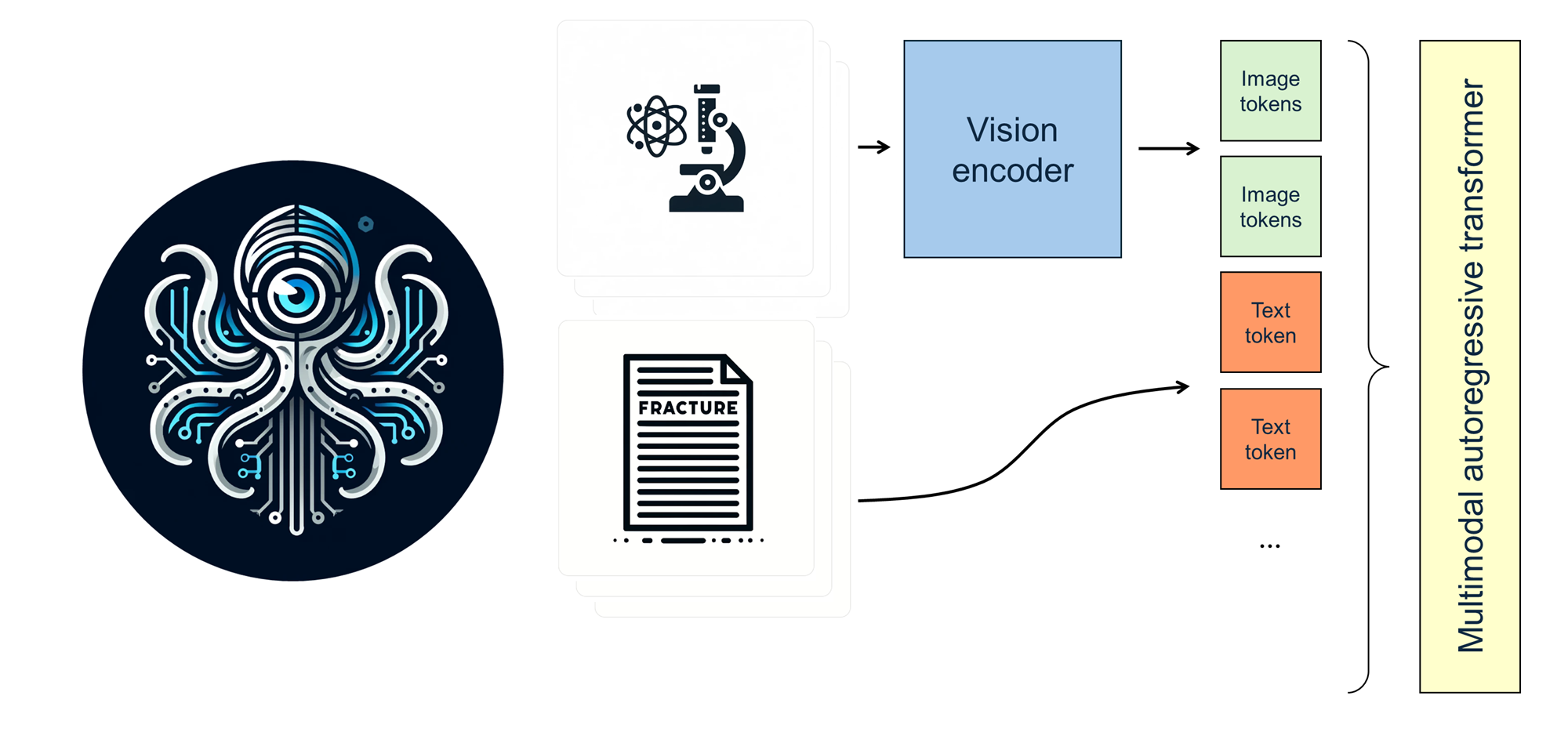
Cephalo provides a robust framework for multimodal interaction and understanding, including the development of complex generative pipelines to create 2D and 3D renderings of material microstructures as input for additive manufacturing methods.
This version of Cephalo, lamm-mit/Cephalo-Llava-v1.6-Mistral-8b-alpha, is based on the Llava-v1.6-Mistral-8b-alpha model. Further details, see: https://huggingface.co/llava-hf/llava-v1.6-mistral-7b-hf.
Given the nature of the training data, the lamm-mit/Cephalo-Llava-v1.6-Mistral-8b-alpha model is best suited for the chat format as follows.
<s>[INST] <image>\nQuestion 1 [/INST]Answer 2</s>
The model generates the text after [/INST]. For multi-turn conversations, the prompt should be formatted as follows:
<s>[INST] <image>\nQuestion 1 [/INST]Answer 1</s>[INST] Question 2 [/INST]Answer 2</s>
This code snippets show how to get quickly started on a GPU:
from PIL import Image
import requests
from transformers import LlavaNextForConditionalGeneration
from transformers import AutoProcessor

model_id='lamm-mit/Cephalo-Llava-v1.6-Mistral-8b-alpha'

model = LlavaNextForConditionalGeneration.from_pretrained(model_id,
                                                          torch_dtype=torch.bfloat16,
                                                          _attn_implementation="flash_attention_2",
                                                         ).to (DEVICE )
processor = AutoProcessor.from_pretrained(
                                            model_id,
                                         )

messages = [
    {"role": "user", "content": "<image>\nWhat is shown in this image, and what is the relevance for materials design?"},
    ]

url = "https://d2r55xnwy6nx47.cloudfront.net/uploads/2018/02/Ants_Lede1300.jpg"

image = Image.open(requests.get(url, stream=True).raw)

prompt = processor.tokenizer.apply_chat_template(messages, tokenize=False, add_generation_prompt=True)

inputs = processor(prompt, [image], return_tensors="pt").to("cuda:0")

generation_args = {
                    "max_new_tokens": 512,
                    "temperature": 0.1,
                    "do_sample": True,
                    "stop_strings": ['</s>',],
                    "tokenizer": processor.tokenizer,
                  }

generate_ids = model.generate(**inputs, eos_token_id=processor.tokenizer.eos_token_id, **generation_args)

# remove input tokens
generate_ids = generate_ids[:, inputs['input_ids'].shape[1]:]
response = processor.batch_decode(generate_ids, skip_special_tokens=True, clean_up_tokenization_spaces=False)[0]

print(response)
Sample output:
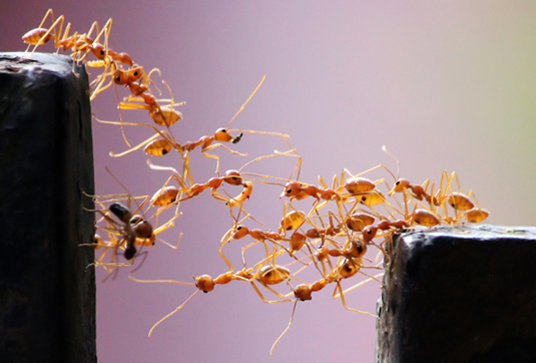 Image by Vaishakh Manohar
The image shows an ant colony in the process of building a bridge between two surfaces. The ants are working together to construct a pathway using their bodies as scaffolding. This demonstrates the concept of cooperative construction in nature, where individual ants contribute to the overall structure.

The relevance for materials design lies in the efficiency and precision of the ant's construction. The ants are able to create a strong and stable bridge with minimal material usage, which can inspire the development of new construction techniques in materials science. The image highlights the importance of collaboration and the use of natural principles in engineering design.
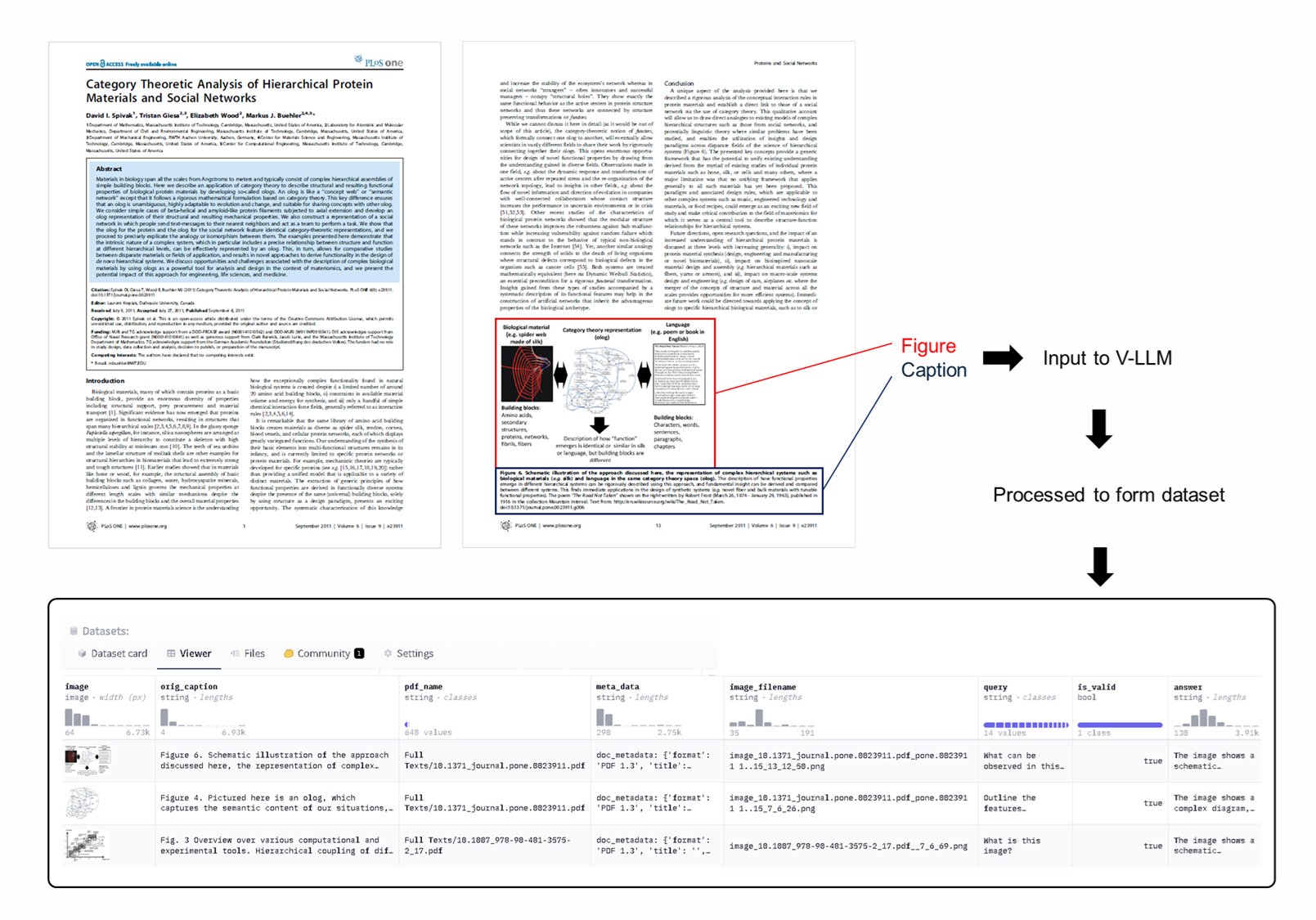
The schematic below shows a visualization of the approach to generate datasets for training the vision model. The extraction process employs advanced algorithms to accurately detect and separate images and their corresponding textual descriptions from complex PDF documents. It involves extracting images and captions from PDFs to create well-reasoned image-text pairs, utilizing large language models (LLMs) for natural language processing. These image-text pairs are then refined and validated through LLM-based NLP processing, ensuring high-quality and contextually relevant data for training.
The image below shows reproductions of two representative pages of the scientific article (here, Spivak, Buehler, et al., 2011), and how they are used to extract visual scientific data for training the Cephalo model.
Please cite as:
@article{Buehler_Cephalo_2024,
  title={Cephalo: Multi-Modal Vision-Language Models for Bio-Inspired Materials Analysis and Design},
  author={Markus J. Buehler},
  journal={arXiv preprint arXiv:2405.19076},
  year={2024}
}